

WordPress’s Gravity Forms allows for a practically endless array of possible forms. Today we want to show you just a few of the possible combinations of features. You’ll also learn about a few useful types of forms that you can build. These range from basic sign-up forms to more advanced registration forms involving conditional logic and extra add-ons. (For more information on web forms and for a more interactive approach to this topic, see our webinar recording. You can also read Part 1 and Part 2 of this series.)
Web forms can be categorized into basic, basic registration, and advanced registration types, each serving different purposes for gathering information online. Basic forms, such as contact or prayer request forms, typically include a few fields like name and email, and are straightforward to set up. Basic registration forms, often used for event sign-ups, incorporate conditional logic to dynamically display fields based on user input, for example, showing child fields only when a specific number of children is entered. Advanced registration forms, leveraging add-ons, offer sophisticated features like limited slots for events, enabling more complex data collection and management.
Basic Forms
A basic form probably only includes a few fields–something like the website guest’s name, email, and a text box. A simple form like this might be a “Contact Us” form, or a place for prayer requests and questions. These are easy to set up and create. Simply drag and drop the desired blocks into place. We’ll talk more about how to create a form later.

Basic Registration Forms
A registration form requires a few more fields, and can also include some conditional logic. In this case, conditional logic might eliminate unnecessary fields. Let’s use the example of a VBS sign-up form. Maybe for each family attending you want to know the name of a parent, their email, the number of children that will be coming, and the names and ages of the children.

You could create a form with a field for the parent’s name, a field for the parent’s email, a field for the number of children, a field for the name of child one and for the age of child one, a field for the name of child two and the age of child two, a field for the name of child three and the age of child three, a field for the name of child four and the age of child four…you get the idea. This form is going to need a lot of fields, because of any big families attending. However, the person signing up with one child doesn’t need to see all the extra fields for multiple children. This is where conditional logic comes in.
In order to keep the form nice and tight so that no one has a bunch of extra empty fields, you can do something that’s actually pretty awesome. You can go into the settings for the field that says “Child 6” and control the settings so that “Child 6” ONLY appears IF the number 6 or higher appears in the “Number of Children” field. You can do the same for each “Child” field, so that when the parent types in the number of children, that number of “Child” fields appear. (For a live demo of a form like this one, you can watch the webinar.)
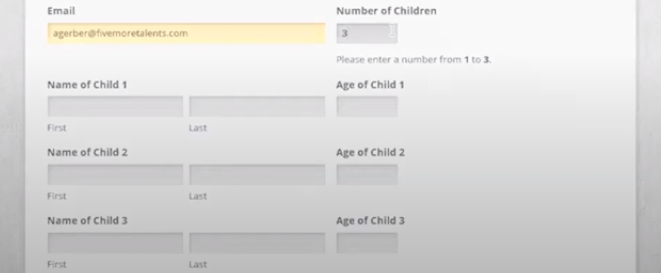
This conditional logic is a core feature of Gravity Forms. The ability to let the form build itself out as it goes is incredibly useful.
While we’re talking about building forms, let’s talk more about how to actually insert a field into the form. Like most of WordPress’s features, the fields are organized in “blocks.” On the editing side of each form, you can drag and drop different blocks into the form. For example, you can add a text box if you want a place for visitors to submit questions and comments. You can add these blocks above, below, or even beside existing fields.
Advanced Registration Forms
An advanced registration form like the example we’ll be using might require extra Gravity Forms add-ons that can be added for an additional cost. That said, the possibilities that become available once you start combining the add-ons are often worth it.
One useful feature is the ability to create limited slots. For example, maybe you want to have a church potluck. However, you want to make sure that people bring different things. Well, you can build a sign-up form. On the form, you can provide a place for people to check the box of the type of dish that they’re bringing. You can then limit the amount of main dishes, side dishes, and desserts. When they begin to fill out the form, they might see that there are three slots left to bring a main dish, but the slots for bringing a dessert are full. (You can see a live demo of this type of form on the webinar.)

What are some other useful Gravity Forms ideas and add-ons?
There are so many options when it comes to Gravity Forms–this blog post barely scratches the surface. Some other add-on options for Gravity Forms include newsletter sign-up or blog subscription forms with MailChimp, online giving forms with Stripe, surveys, user registration (if you want to have a separate members area, for example), signature options, and limit dates. To access form templates, you can visit Gravity Forms’ site.
If you have specific questions about how to pull a special kind of form together, feel free to reach out to us. No matter what you need, by combining different add-ons and elements, your idea should be achievable.
Photo by Priscilla Du Preez on Unsplash
Frequently Asked Questions
- 1 What types of basic web forms can I create for my church website using Gravity Forms?
-
You can create basic forms such as "Contact Us" forms or forms for prayer requests and questions. These typically involve a few fields like name, email, and a text box, and are easy to set up with Gravity Forms' drag-and-drop interface.
- 2 How does conditional logic help manage fields in complex registration forms, like for VBS sign-ups?
-
Conditional logic allows you to dynamically show or hide form fields based on a user's previous input. For a VBS sign-up, this means fields for additional children will only appear if the parent specifies a higher number of children, making the form cleaner and more efficient.
- 3 What are the benefits of using Gravity Forms for building different types of web forms on a WordPress site?
-
Gravity Forms for WordPress offers a practically endless array of possible forms, from simple contact forms to more advanced registration forms. It allows for features like conditional logic and extra add-ons, making it versatile for various church website needs.


